

If you manage a channel for a business, a coach or an agency client, you need a plan that can survive the next busy week. Here is a workable 90-day approach, from channel diagnosis to publishing and review.
The 90-day workflow at a glance
Use the first phase to define your audience, review recent videos and collect clear viewer questions. Turn those findings into a practical content calendar, then use each published video to test one idea about packaging or audience fit. Record what you changed and what viewers actually did before scaling a format. A plan should make decisions easier, not create a rigid upload quota.
Why a 90-day plan works better than random uploads
Growing a YouTube channel is easier to manage when every upload has a clear job. One video may answer a question people search for. Another may introduce your expertise to people browsing Home. A third may help viewers understand the next step after watching an earlier video. Without a plan, teams often spend most of their time choosing topics at the last minute. They publish, look at the view count, and start over. That makes it difficult to identify what is actually working.
A 90-day plan gives you enough time to research, publish, review early patterns and improve the next batch. It is not a promise that a channel will grow in three months. Search demand, competition, video quality, audience needs and consistency all affect outcomes. The purpose is to replace guesses with a repeatable process that a solo creator or a small team can actually follow.
Days 1–10: Audit the channel before you write the calendar
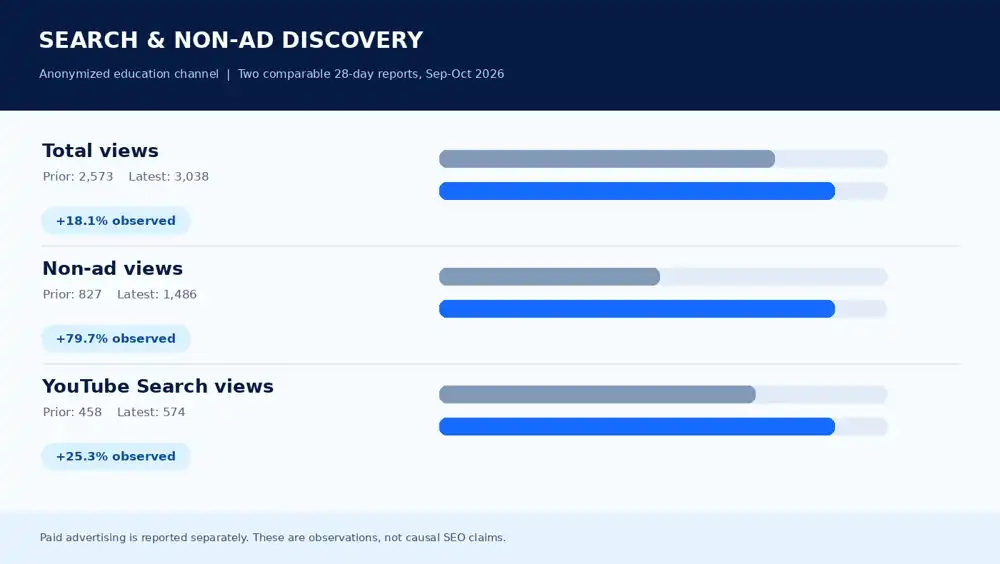
Start in YouTube Studio. Separate traffic from YouTube Search, Browse features, Suggested videos, external websites and advertising. Look at the last 90 days alongside the previous period. Identify which videos attracted new viewers, which encouraged people to watch another video, and which generated the actions you care about. A channel selling a professional service should not judge every upload by views alone. Qualified enquiries, relevant audience questions and visits to a useful resource can matter more.
Read the audience retention graph for several videos instead of relying on a single average. Check when people leave, what they replay and whether the opening seconds match the title and thumbnail. Review click-through rate by traffic source, because a video’s Home impressions and Search impressions may behave differently. Write down five observations you can act on. A useful audit finishes with decisions, not a large spreadsheet that nobody opens again.
Days 11–20: Build topic clusters around viewer questions
Choose three or four problems your intended viewers repeatedly face. For a WordPress audience, these might be a slow site, confusing plugin settings, broken checkout and poor mobile design. For a parenting education channel, the questions would be different. Search suggestions, comments, customer support messages and your own sales conversations can reveal natural wording. Check whether the query needs a tutorial, comparison, explanation or product demonstration before you create an outline.
Group related questions into a sequence, but give each video a distinct purpose. A broad guide can introduce the subject; narrower videos can answer the specific questions it raises. This makes internal recommendations through playlists, end screens and descriptions more useful. Do not copy a competitor’s script or chase a keyword because a tool marks it as high volume. Your channel needs a reason for viewers to return to your version of the answer.
Days 21–30: Prepare titles, thumbnails and strong openings
Before filming, write several accurate title options and sketch the thumbnail concept. Decide what the viewer should learn or be able to do after watching. A searchable title should name the problem in clear language. A curiosity-based title can work for broader topics, but it still needs to represent what the video delivers. YouTube’s official title and thumbnail guidance emphasizes accuracy and helping viewers decide whether to watch.
Treat the first 20–30 seconds as part of packaging. Do not begin with a long company introduction when the viewer wants an answer. State the problem, explain what you will show and move into the useful information. If a thumbnail promises a before-and-after comparison, the video should show that comparison. Better packaging cannot compensate for a misleading promise. Write the intro before editing so the thumbnail, title and actual content stay aligned.
Month 2: Publish on a schedule your team can maintain
Choose a realistic cadence rather than a number that looks impressive in a plan. One strong long-form video each week may be more sustainable than daily uploads that overwhelm the editor and leave no time for research. Assign responsibility for research, filming, editing, thumbnails, metadata, quality assurance and publication. Set a date for each handoff. If a video needs client approval or a medical or legal expert review, reserve time for that before the upload date.
Use a simple publishing checklist: factual accuracy, clear audio, readable captions when appropriate, honest thumbnail, working links, chapter structure where useful, end screen availability and a description that helps viewers. Add relevant videos to playlists rather than creating dozens of empty playlists. The publishing process should be straightforward enough that a second team member could follow it without guessing.
If you have only a few existing uploads to improve, starting with one-video YouTube SEO optimization or a five-video optimization package may be easier to manage than a monthly commitment. Choose based on how many videos genuinely need a review; publishing more does not automatically solve discovery problems.
Keep search, recommendations and Shorts in perspective
YouTube Search and personalized recommendations solve different discovery problems. YouTube explains that Search considers relevance, engagement and quality, while recommendations respond to individual viewing interests and satisfaction. See how YouTube Search works and how recommendations work. These are reasons to design useful videos, not reasons to invent a hidden algorithm formula.
Shorts can introduce a topic or direct attention toward your channel, but a Short should make sense as a standalone viewing experience. Avoid assuming that a viral Short automatically creates loyal viewers for longer videos. Compare formats separately in analytics. When a topic performs well in Shorts, ask whether viewers would genuinely benefit from a more detailed guide. Create the longer video only when there is a clear answer worth developing.
Month 2 review: Use a decision log, not only a scorecard
After each upload, record the audience question, title, thumbnail concept, traffic source mix, first-minute retention and a few viewer comments. Note one thing you would repeat and one thing you would test differently. Resist rewriting every title after a few hours. Small channels and narrowly focused videos can have limited data, so early percentages may move sharply as impressions change. Compare against similar topics and similar traffic sources wherever possible.
If the click-through rate looks low but retention is strong, revisit the title and thumbnail promise. If people click but leave immediately, inspect the opening and how quickly the video answers the question. If the video retains a relevant audience but gets few impressions, look at topic demand, channel fit and distribution. There is no single universal benchmark that makes a video’s performance good or bad. The useful question is what the data suggests you should change next.
Month 3: Turn successful topics into connected viewing
Identify the questions viewers asked after your first videos. Answer the strongest ones in follow-up uploads and link them naturally from the relevant older content. For a service channel, one technical walkthrough can lead to a related checklist and then a detailed audit explanation. For an educational channel, a beginner guide can lead to intermediate and advanced lessons. This is useful content architecture, not an excuse to repeat the same video with a slightly different title.
Update older descriptions, playlists and end screens when the newer videos provide genuine next steps. Review your channel homepage so a visitor can understand who the channel helps. Avoid adding ten calls to action inside one video. If your goal is customer enquiries, direct interested viewers to a focused page with the right form or contact method. You can review the same approach in our YouTube channel audit package.
What a useful monthly report should show
A monthly report should distinguish what the team controlled from what the audience did. Record topics planned, videos published, title and thumbnail tests, improvements to older videos and changes in the content process. Then show reach, watch behavior and meaningful business actions with enough context to interpret them. Compare performance by source rather than combining every impression into one number. Flag videos whose analytics are too limited for a confident conclusion.
End the report with the next three decisions: which topic cluster to continue, which packaging test to run and what obstacle needs attention. If a video did not perform, say so and give a plausible explanation without pretending the cause is proven. If you use paid advertising, keep organic and paid performance separate. For teams that want a managed publishing workflow, ScaleKin offers YouTube Growth Foundation and larger monthly options based on the scope required.
If your channel has a larger production schedule and needs frequent reviews, compare the scope of YouTube Growth Acceleration with YouTube Authority and Scaling. The number of uploads and reporting responsibilities should fit the actual production capacity; a higher package is not a guarantee of better reach.
Common mistakes that make a growth plan difficult to execute
The most common failure is trying to change every part of the channel at once. Publishing more, changing the niche, redesigning all thumbnails and starting ads in the same week makes it hard to learn what helped. Another mistake is treating tags as the main growth strategy. Tags may support clarification, but the viewer’s reason to click and stay matters much more. You should also avoid buying engagement or promising a guaranteed number of subscribers.
Keep a small backlog of approved topics so the calendar survives a delayed shoot. Ask the person doing the edit how long the actual work takes, and plan around that constraint. Review analytics at predictable intervals rather than refreshing them constantly. A plan becomes useful when the team can explain why each video exists, what success would look like and which decision comes next if the first version underperforms.
Frequently asked questions
Should a new channel post daily? Not necessarily. Start with a rhythm that allows useful research, clear production and a quality check. Then increase output only if your process can sustain it. Is SEO enough to grow on YouTube? No. Search intent matters, but viewing satisfaction, packaging and relevant recommendations also affect discovery. Should I run YouTube Ads? Only when paid distribution fits a defined objective and you can measure the right outcome. Advertising does not replace channel strategy or automatically improve organic recommendations.
How many videos should the first 90 days include? There is no universal number. A realistic plan might involve a few carefully prepared videos plus revisions of existing content. Focus first on getting a workflow you can repeat. When should I judge results? Review early signals after publication, then use longer time windows to evaluate patterns. A small change over a few days should not trigger a complete strategy reversal. What should I do next? Start with the channel audit, a topic map and your first four outlines. Everything else follows from those decisions.
A small action you can take today
Open YouTube Studio, choose three videos that represent the audience you want, and write down their main traffic sources, opening retention pattern and the question each one answers. From there, plan one related video that fills a real gap. If you would like a second set of eyes on the topic map and publishing process, explore ScaleKin’s YouTube SEO and channel growth service.
About the author: Mohammed Tarikul Islam Shohan works on YouTube SEO, channel strategy and digital marketing at ScaleKin. He is a Top Rated freelancer on Upwork. This article explains a practical planning method; examples are illustrative and no specific channel result is promised.